

Disclosure: the Firecrawl links in this guide are affiliate links, so BoostStash may earn a commission if you sign up through them. Pricing and feature details are tied to Firecrawl’s own documentation.
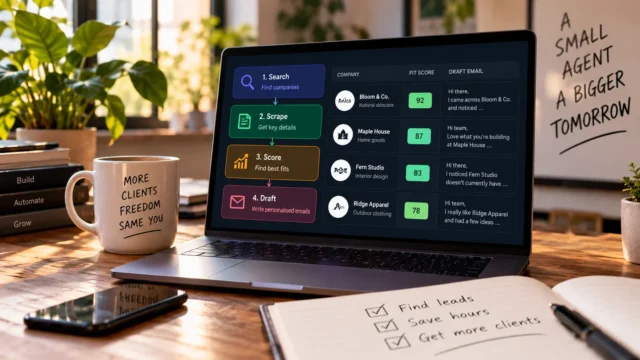
Finding the right person at the right company usually takes four tabs: a maps listing, the company website, LinkedIn and an email finder. Repeat that for fifty companies and a week is gone. A Grok Bot connected to Firecrawl‘s Alexandria data library can do the same research from one prompt and hand you a spreadsheet at the end.
This guide shows how to build that bot. You give it a type of business and a location, and it returns company names, ratings, decision makers, LinkedIn profiles and work emails, each with a source. The setup takes three steps and no code. Below you will find the prompt I use, what the output looks like, what it costs in credits and the rules that keep you on the right side of data protection law.
If you sell to businesses in a defined niche and city, and you spend hours on prospect research, this is worth an afternoon. Treat the result as a researched shortlist and not as a mailing list. Work emails cost credits, and you still decide who gets contacted.
People enrichment means turning a company name into a contact you can reach
Enrichment starts with a thin record, such as a company name or a domain, and fills in the gaps. For sales and outreach that means who runs marketing, what their title is, where their LinkedIn profile lives and which work email reaches them. It is currently the most common reason people connect Firecrawl to an AI agent.
The old way to do this was a stack of separate subscriptions, each with its own login and its own export format. The new way is to ask an agent in plain language and let it call the right data providers for you. The agent searches, matches, pulls the fields and writes the file.
Grok Bot runs the job, Firecrawl is the connection and Alexandria holds the data
Three pieces work together here, and it helps to know which one does what before you start clicking.
| Piece | Job | Cost |
|---|---|---|
| Grok Bot | The agent that takes your prompt, runs on its own cloud computer and can work on a schedule while you are away | Check Grok Bot’s current plans |
| Firecrawl | Gives the bot web search, scraping and the link to Alexandria | Free plan with 1,000 credits a month |
| Alexandria | Firecrawl‘s library of data providers, including Apollo, FullEnrich and Data Legion for people and company data | Paid in Firecrawl credits per call |
Alexandria was introduced in September 2026 as a library of data sources that agents can use through a single Firecrawl account. The people and company enrichment pack followed on October 1, 2026. It covers Apollo for person search and work emails, FullEnrich for emails and mobile numbers, and Data Legion for matching people and companies. People Data Labs has been added since. Beyond enrichment, the same library includes public records, financial data and travel data, but this guide only covers the people side.
Set it up in three steps
- Create a Firecrawl account and accept the provider terms. The free plan is enough to test. In the dashboard, find the Alexandria provider settings, open Apollo and the other people providers, review their terms and accept them. An organization admin does this once.
- Create the bot and give it a first job. Use the plus button to build one, or ask your main assistant to create it for you. Then hand it a business type and a location.
Step two exists because enrichment returns personal data about real people, and the providers want you to agree to their usage terms before the first call. If you skip it, the call comes back with a THIRD_PARTY_DATA_TERMS_REQUIRED error and a link to the page where an admin can accept. An agent should never accept those terms for you without asking.
One more detail: Alexandria is not available on Firecrawl‘s keyless tier. You need a signed-in account, even if you stay on the free plan.
The prompt that creates the lead finder bot
You can write the bot’s instructions once and reuse them for every search. This is the version I use, with two safety lines I took from Firecrawl‘s own prospecting guide: never invent data, and stop to ask before spending a lot of credits.
Create a bot called Lead Finder.

When I give it a type of business and a location, it should use
Firecrawl Alexandria to find matching companies, pull their reviews
and ratings, and find the key decision makers with name, title,
LinkedIn URL and work email.

For each company, write one sentence on why it is a good lead for
[what I sell], with a source link.

Put everything in a Google Sheet or CSV, one row per person.

Rules:
- Never invent a company, a person or an email. Leave a field
  blank if you could not find it.
- Before any step that would cost more than 100 credits, stop and
  tell me the estimated cost.
- Only enrich the shortlist of best-fit companies, not the full list.
Replace the bracketed part with a sentence about your own offer. “Marketing help for small AI companies” gives the bot something to judge fit against. Without it, you get a list of companies and nothing that tells you why any of them matter.
What comes back from a real search
I ran two searches, and the output is a good picture of what to expect.
The first asked for Series A AI startups in London. The bot returned a list with what each company does, its decision makers and its logo. I then narrowed to one company, Finster AI, and asked for its decision makers with work emails. The bot returned LinkedIn profiles for each person, work emails for some of them, and a CSV file ready to drop into a CRM or another agent. I’ve left the emails out of this article for GDPR reasons.
The second search asked for AI companies in Santa Monica. This time the bot built a Google Sheet with company name, website, address, and ratings from Google Maps, Facebook and Glassdoor. Beside each company sat decision maker names, titles, LinkedIn profiles and emails.
Notice the word “some” in the first example. Enrichment is a match against provider databases, so not every person has a findable work email. Expect gaps, and plan your outreach list around the rows that came back complete.
How it compares with a regular agent search
I also ran a comparison. The prompt looked for accountants and financial advisers in Brighton, UK, and I tested the same agent with Alexandria and with its built-in search tools. An AI model acted as judge. Alexandria came out ahead, mainly because it returned direct emails for senior people and the built-in tools could not.
Read that result with care. The judge was another AI model and the test covered one query. The conclusion is still believable, because a general web search is poor at finding a named person’s work email. A database built for that purpose should do better. For a decision, run your own test on a niche you know well and check ten rows by hand.
What it costs: person search is free, emails are where credits go
Firecrawl lists the price of each Alexandria capability before you call it, and discovering what is available costs nothing. For the people pack, the useful numbers are these:
Apollo person search: 0 credits. Work email lookup: about 30 credits per email found. Free plan: 1,000 credits a month.
On the free plan, 1,000 credits cover roughly 33 work emails if you spent nothing else. That is enough to test the whole workflow on one niche. It is not enough to run a daily lead scout, so a scheduled bot will need a paid plan. This is why the prompt above tells the bot to enrich only the shortlist and to stop at 100 credits.
If you want to see current prices from inside your agent, Firecrawl‘s command line tool can list capabilities with their costs. Check before a batch run, since prices can change.
Rules that keep the list legal and your emails out of spam
Enrichment data comes with conditions, and they differ by provider. Firecrawl notes, for example, that FullEnrich’s terms do not allow marketing to personal email addresses. Read the terms you accept in the dashboard, because they are the actual rules for your use.
Beyond provider terms, the law where your recipients live applies. Rules on cold B2B email differ between the EU, the UK, the US and elsewhere, and I’m not a lawyer, so check them for your own market. Three habits help in almost every case:
- Keep a do-not-contact list and make the bot skip anyone on it.
- Send only to work addresses, with a clear reason you are writing and an easy way to opt out.
- Read every row and every draft before anything goes out. The bot drafts and you decide.
If you prefer to build the research step in code, my Python agent that finds clients covers the same idea with a human approval step. For plan limits and the add-ons that raise the bill, see the Firecrawl pricing guide.
My recommendation: let the bot do the research and keep the sending manual
This setup fits freelancers, small agencies and founders who sell to a clear niche in a clear place and want a researched list each week. It fits less well if you need thousands of contacts a month, because credits add up, or if your buyers are hard to find on LinkedIn and provider databases.
Start with one niche and one city. Run the prompt, check ten rows against LinkedIn, and count how many came back with a usable email. That number tells you whether the free plan proves the idea and whether a paid plan is worth it.
Run your first enrichment search on the free plan
Create a Firecrawl account, accept the provider terms in the dashboard and give your bot one niche in one city. The free plan’s 1,000 credits are enough to see whether the results are good enough for your market.
Try Firecrawl free → Affiliate link. BoostStash may earn a commission if you sign up.Questions people ask before building this
Do I need to write code?
No. You connect Firecrawl to Grok Bot, accept the provider terms and describe the bot in plain language. Code only matters if you want to build the same workflow outside the app.
Is the Firecrawl free plan enough?
It is enough to test. The free plan has 1,000 credits a month, person search through Apollo costs nothing, and work emails cost about 30 credits each. Start with Firecrawl’s free plan and check your own results before upgrading.
Will every person come back with a work email?
No. Providers match against their own databases, so some people will have a LinkedIn profile and no email. Plan for gaps and filter your list to complete rows.
Can it run on a schedule?
Yes. Grok Bot works on its own cloud computer, so a job can continue after you close the app and can run on a schedule, for example every morning. Keep schedules few at first, because each run spends credits.
Is it legal to email the people it finds?
It depends on where the recipient is and on the provider’s terms. Rules for cold B2B email differ by country, so check them for your market. Send to work addresses only, include an opt-out and honor do-not-contact requests.
Why do I have to accept provider terms?
Enrichment returns personal data about real people, and each provider requires your team to agree to its terms before the first call. An organization admin accepts them once in the dashboard.
How I built and checked this
I built this lead enrichment bot in Grok Bot and ran it on the searches described above. I checked the product details against Firecrawl‘s documentation and blog posts on Alexandria, people enrichment and prospecting. Sources count Alexandria’s providers differently, and one third-party write-up lists 430 as of early November 2026, so I avoided a fixed number. Check Firecrawl‘s Alexandria page for the current total.