ClickUp Brain & API 2025: Turn Projects Into Intelligence
Modern project teams want more than digital checklists. They need automation that eliminates repetitive work, AI that surfaces insights from buried data, and custom workflows that connect ClickUp to every other tool in their stack.
That’s where ClickUp Brain and the ClickUp API transform ClickUp from a capable project manager into a complete work operating system. Brain adds contextual AI that understands your projects—not generic ChatGPT responses. The API unlocks programmatic access to everything in your workspace, enabling advanced reporting, custom integrations, and workflow automation that would cost enterprise prices in other platforms.
Together, they’re the power combo that makes ClickUp genuinely intelligent and infinitely extensible—capabilities usually reserved for tools 10x more expensive.
Curious? Open a free ClickUp account and follow along as you explore these advanced features.
What Is ClickUp Brain?
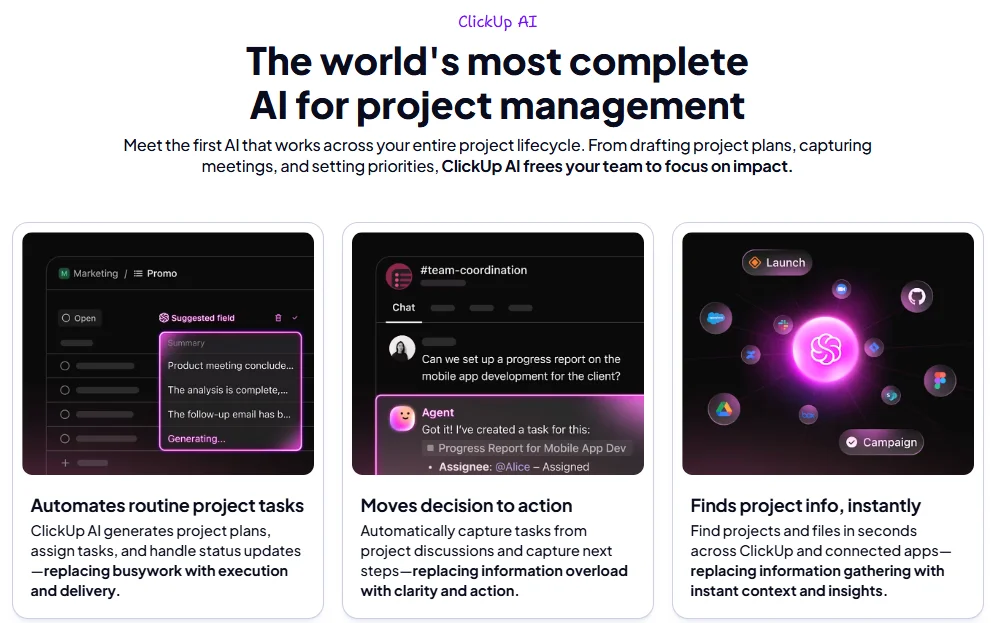
ClickUp Brain is ClickUp’s integrated AI assistant, purpose-built for project management and deeply embedded throughout your workspace. Unlike generic AI tools where you copy-paste context, ClickUp Brain has native access to your tasks, docs, comments, team assignments, and project history.
Here’s what makes it different: ClickUp Brain understands your actual work.
Real Workflow Examples
Auto-Generating Meeting Summaries
After a project kickoff meeting documented in ClickUp Docs, ask ClickUp Brain: “Summarize this meeting and create action items.” It reads the doc, identifies decisions and commitments, generates a concise summary, and creates assignable tasks—all in seconds. No manual extraction, no missed follow-ups.
Answering Complex Project Questions
Instead of manually reviewing 40 tasks across three sprints to find blockers, ask: “What’s blocking the Q1 mobile launch?” ClickUp Brain scans task statuses, comments, dependencies, and due dates to give you a coherent answer: “Three tasks are blocked waiting on design assets from Sarah, and the API integration is delayed pending security review.”
Drafting Project Documentation
Writing a project brief from scratch? Give ClickUp Brain a few bullet points about goals and deliverables, and it generates a structured document with objectives, success metrics, timeline sections, and stakeholder roles. You refine it rather than starting from a blank page.
How ClickUp Brain Works in Your Workspace
ClickUp Brain isn’t a separate chatbot you visit—it’s integrated directly into:
Tasks
Generate descriptions, create subtasks, draft comments
Docs
Write content, expand outlines, summarize pages
Search
Ask natural language questions about your workspace
Dashboards
Get insights and summaries from project data
Because it has full workspace context, ClickUp Brain provides genuinely useful assistance rather than generic AI responses. It knows who’s assigned to what, which projects are behind schedule, and where dependencies create bottlenecks.
Want to see it in action? Test your own project with ClickUp Brain
Pricing & Access for ClickUp Brain
ClickUp Brain is an optional add-on available across all plan tiers (Free, Unlimited, Business, Enterprise) for approximately $5 per user per month. It’s not included by default—you activate it when your team is ready to leverage AI assistance.
Who Should Consider ClickUp Brain?
Worth it for teams that:
- Manage 10+ active projects simultaneously
- Spend significant time compiling status reports and updates
- Write a lot of documentation (briefs, specs, meeting notes, SOPs)
- Need to quickly surface information buried in hundreds of tasks
- Want to reduce administrative overhead for project managers
Probably overkill if:
- You’re a solo user with simple task lists
- Your team has fewer than 5 members with straightforward workflows
- Projects are short-term (under 4 weeks) with minimal documentation
Cost perspective: If ClickUp Brain saves each project manager 2-3 hours per week on status updates, documentation, and information retrieval, the $5/user/month pays for itself immediately. That’s $60/year for genuinely useful AI—compare that to generic AI tools that cost more and lack project context.
For detailed plan breakdowns and what’s included at each tier, see our comprehensive ClickUp review.
How to Use ClickUp Brain Effectively
ClickUp Brain becomes more valuable when you know specific prompts and workflows that deliver results. Here are practical, copy-paste examples.
Scenario: You have a rough task description: “Fix login bug”
Prompt:
Expand this task description with: acceptance criteria, potential causes, testing steps, and estimated complexity
Result: ClickUp Brain generates:
- Detailed acceptance criteria (user can log in with valid credentials, error messages display correctly, etc.)
- Common causes to investigate (session timeout, password validation, cookie issues)
- Testing checklist
- Complexity estimate based on similar tasks in your workspace
Scenario: Sprint ended, you need to report progress to stakeholders
Prompt:
Summarize Sprint 12: What was completed? What’s blocked? What’s carrying over to Sprint 13?
Result: ClickUp Brain scans all Sprint 12 tasks, checks statuses, reads comments about blockers, and produces:
- Completed work (with task titles)
- Blocked items and reasons
- Carryover tasks with explanations
- Team velocity compared to previous sprints
This replaces 30-45 minutes of manual compilation.
Scenario: You have meeting notes in a ClickUp Doc with decisions and discussions
Prompt:
Read this meeting doc and create tasks for every action item. Assign based on who was mentioned in the discussion.
Result: ClickUp Brain identifies actionable commitments, creates tasks with appropriate assignees based on context, links them to the meeting doc, and sets suggested due dates based on urgency indicators in the notes.
Prompt:
Who on the development team has capacity this week to take on a high-priority bug fix?
Result: ClickUp Brain checks current task assignments, due dates, and priorities for your dev team members and reports: “Alex has 3 tasks due Friday but nothing urgent. Jamie is overloaded with 8 high-priority items. Morgan finished their sprint early and has capacity.”
These examples show ClickUp Brain’s real value: eliminating manual information gathering and administrative work so project managers focus on decisions, not data compilation.
What Is the ClickUp API?
The ClickUp API is a developer-first interface that lets you programmatically access and manipulate everything in your ClickUp workspace: tasks, lists, spaces, custom fields, time tracking, comments, docs—the entire data model.
In simpler terms: the API allows external applications, scripts, and automation platforms to read from and write to ClickUp without anyone manually clicking buttons.
Why the API Matters for Project Teams
- Advanced reporting: Pull ClickUp data into business intelligence tools (Power BI, Tableau, Looker) for executive dashboards that combine project data with financial, sales, and operational metrics.
- Custom automations: Trigger ClickUp actions based on external events—when a customer support ticket is created, automatically create a bug task in ClickUp’s engineering sprint. When a contract is signed in your CRM, generate a client onboarding project with all tasks pre-populated.
- Integration with business systems: Sync ClickUp with HR systems (automatically create onboarding tasks for new hires), accounting tools (track project budgets and actuals), or custom internal platforms.
Low-Code/No-Code Options
You don’t need to be a developer to leverage the API. Platforms like Zapier, Make (Integromat), and Power Automate provide visual interfaces for connecting ClickUp to 1,000+ other apps. You can build sophisticated workflows—”When a form is submitted, create a ClickUp task with custom fields populated”—without writing code.
For teams with development resources, the API unlocks unlimited customization. For complete API documentation and technical specifications, visit ClickUp’s official API docs.
ClickUp API Use Cases & Examples
Let me show you how the API delivers real business value across different scenarios.
Reporting & Business Intelligence
Problem: Executives need weekly project health reports that combine ClickUp task data with budget information from your accounting system.
API Solution: Write a script (or use a BI tool’s ClickUp connector) that pulls all active projects, extracts completion percentages, at-risk tasks, and team utilization, then joins this with budget data from QuickBooks or NetSuite.
Result: Real-time executive visibility without manual spreadsheet compilation.
Advanced Workflow Automations
Problem: Your agency onboards 5-10 new clients monthly. Each onboarding requires 40+ tasks across departments.
API Solution: When a deal is marked “Won” in your CRM, trigger an API call to ClickUp that creates a new Space for the client, generates all 40 onboarding tasks using a template, populates custom fields with client-specific data, and assigns tasks to appropriate team members.
Result: Zero manual project setup. Client onboarding starts immediately.
Custom Integrations
Problem: Your HR system tracks employee data, but project managers need to see team availability in ClickUp (vacation days, training schedules, capacity).
API Solution: Build a two-way sync where HR system sends absence data to ClickUp via API, creates “Out of Office” tasks on team members’ calendars, and updates capacity in Workload view automatically.
Result: Project managers see accurate team availability without switching systems.
Basic Code Example: Fetching Tasks
Here’s a simple Python example showing how to retrieve tasks from a ClickUp list:
import requests


# Authentication

api_token = "your_api_token_here"

headers = {"Authorization": api_token}


# Fetch tasks from a specific list

list_id = "your_list_id"

url = f"https://api.clickup.com/api/v2/list/{list_id}/task"


response = requests.get(url, headers=headers)

tasks = response.json()


# Process tasks

for task in tasks['tasks']:

    print(f"Task: {task['name']}, Status: {task['status']['status']}")
This basic script could be expanded to:
- Filter tasks by custom fields
- Calculate sprint velocity
- Generate reports
- Trigger notifications based on task status
You don’t have to be a developer to benefit—try ClickUp’s ready-made automations right in your free workspace
AI + API Together: Advanced Workflows
The real power emerges when you combine ClickUp Brain’s intelligence with the API’s extensibility.
Weekly Auto-Summarized Status Reports
Workflow: Every Friday at 5 PM:
- API script pulls all tasks completed this week across your workspace
- Sends this data to ClickUp Brain with the prompt: “Generate an executive summary of this week’s progress, highlighting wins, risks, and next week’s priorities”
- ClickUp Brain creates a formatted summary
- API automatically posts it to a Slack channel and emails stakeholders
Result: Zero-effort weekly reporting. Stakeholders always have current visibility.
AI-Powered Project Health Monitoring
Workflow:
- API monitors all active projects for risk indicators (overdue tasks, blocked dependencies, team members over capacity)
- When risks are detected, API triggers ClickUp Brain to analyze the situation
- ClickUp Brain generates a summary: “Project X is at risk. Three critical tasks are overdue, and two team members are at 150% capacity”
- API creates an alert task for the project manager with recommended actions
Result: Proactive problem detection instead of reactive firefighting.
Auto-Generated Task Lists from External Tools
Workflow:
- Customer support receives high-priority feature requests via Zendesk
- API captures these requests and sends them to ClickUp Brain
- ClickUp Brain analyzes the request, generates detailed user stories with acceptance criteria
- API creates tasks in the product backlog with proper formatting and custom fields populated
Result: Customer feedback becomes actionable engineering tasks automatically.
Editorial note: These “AI + API” workflows are typically enterprise-only features in tools like Asana or Monday—costing $20-30/user/month. ClickUp brings them to small teams for $12/user/month (Business plan) + $5/user for Brain. That’s the fundamental value proposition.
For more comparisons with other tools, check out our guides on ClickUp vs Asana and ClickUp vs Notion.
Limitations & When You Don’t Need This Yet
Let’s be honest: ClickUp Brain and the API are overkill for some teams.
Skip these features if:
- You’re a solo freelancer or team of 2-3 people managing simple projects
- Your workflows are straightforward with minimal documentation needs
- You’re just starting with project management tools and learning basic task tracking
- Writing project updates and finding information isn’t a time burden yet
The better approach: Start with ClickUp’s core features (Free or Unlimited plan). Build solid project management habits—using views, automations, templates, and basic integrations. After 3-6 months, when you’re comfortable and hitting limitations, then explore Brain and API capabilities.
This builds trust because I’m not pushing features you don’t need yet. ClickUp’s value doesn’t depend on advanced features—those are accelerators for teams already executing well.
Final Verdict
ClickUp is a powerful project management platform on its own. But ClickUp Brain and the API elevate it into a complete work operating system that adapts to your exact needs, learns from your projects, and integrates with every tool in your business.
Two Clear Paths for Adoption
Path 1: Start Simple, Scale Up
- Begin with ClickUp’s Free or Unlimited plan ($7/user/month)
- Master core PM features: tasks, views, basic automations, templates
- Build workflow muscle with your team
- Add ClickUp Brain ($5/user/month) when documentation and status reporting become time sinks
- Explore API when you need custom integrations or advanced reporting
Path 2: Go All-In (for technical teams)
- Start with Business plan ($12/user/month) for full API access
- Activate ClickUp Brain immediately
- Build custom workflows from day one
- Leverage ClickUp as your central work platform integrated with all business systems
Most teams should follow Path 1. You don’t need advanced features on day one—you need solid project execution habits. Brain and API become valuable after you’ve established those foundations.
But when you’re ready, they transform ClickUp from a great project manager into an intelligent, automated work platform that grows with you indefinitely.
Ready for real AI-powered project management?
Open your ClickUp workspace now, test everything free—no credit card required
FAQ
Is ClickUp Brain included in the Free plan?
No, ClickUp Brain is an optional add-on available for approximately $5 per user per month across all plan tiers (Free, Unlimited, Business, Enterprise). You can use ClickUp extensively without Brain—it’s designed for teams that need AI assistance for documentation, summarization, and information retrieval. Start with the core platform, then add Brain when the value becomes clear for your workflows.
Is my data secure with ClickUp Brain?
Yes. ClickUp Brain operates within ClickUp’s existing security infrastructure, which includes SOC 2 Type II compliance, GDPR compliance, and enterprise-grade encryption. Brain processes your workspace data to provide contextual responses, but it doesn’t train external AI models on your proprietary information. Your data remains private and is not shared with third parties. For specific security requirements, review ClickUp’s security documentation or contact their enterprise team.
Do I need a developer to use the API?
Not necessarily. While the API is designed for developers, you can leverage it through no-code/low-code platforms like Zapier, Make (Integromat), or Power Automate. These tools provide visual interfaces for connecting ClickUp to other apps and building automations without writing code. However, for advanced custom integrations, reporting dashboards, or complex workflows, having development resources (internal team or contractor) significantly expands what’s possible.
Can Zapier or Make be used instead of the API directly?
Yes, for many use cases. Zapier and Make connect to ClickUp’s API behind the scenes, providing user-friendly interfaces for building integrations. They’re perfect for standard workflows: creating tasks from form submissions, syncing data between tools, sending notifications based on ClickUp events. Direct API usage is only necessary for: complex custom logic, high-volume data processing, advanced reporting requiring direct database access, or integrations with proprietary internal systems.
Can I automate reporting or create custom dashboards?
Absolutely. ClickUp’s native dashboards are powerful for standard project reporting—you can build custom widgets pulling from tasks, time tracking, custom fields, and more. For advanced reporting that combines ClickUp data with external business systems (financial data, CRM, HR), use the API to extract ClickUp data into business intelligence tools like Power BI, Tableau, or Looker. This enables executive dashboards that show project health alongside business metrics.
Are Brain and API worth it for small teams?
ClickUp Brain: Worth it for small teams (5-10 people) if you write a lot of documentation, manage complex projects, or spend significant time on status updates. Not worth it for very small teams (2-3 people) with simple task lists.
ClickUp API: Usually overkill for small teams unless you have specific integration needs or technical founders who want to build custom workflows. Most small teams get tremendous value from ClickUp’s native features and standard integrations before needing API access.
Start simple, add advanced features when you hit clear limitations.
Can I turn off Brain if we don’t use it?
Yes. ClickUp Brain is an optional add-on that you can activate or deactivate at any time. If you try it and find your team isn’t using the AI features, simply turn it off and stop paying the monthly add-on fee. There’s no lock-in or penalty for disabling it. This makes it low-risk to test Brain for a month or two to see if it delivers value for your specific workflows.
For comprehensive feature breakdowns, workflow examples, and team implementation strategies