


Sponsored content and affiliate disclosure: this article is sponsored. The Bluehost AI Builder links on this page are affiliate links, so BoostStash earns a commission if you sign up through them, at no extra cost to you. The screenshots come from my own Bluehost AI Builder project. Features and pricing were checked against Bluehost’s own AI Builder page on November 17, 2026.
I wanted to know what a no-code AI website builder actually hands you after a single request. So I gave Bluehost AI Builder one long brief for a made-up digital marketing agency called NexaGrowth and watched what came back: five pages, a navy and electric blue look, and a consultation booking form on the Contact page.
This review walks through what I asked for, what the builder produced, which parts are genuinely useful and which parts you will need to rewrite before going live. It also covers what it costs. Bluehost AI Builder is $0 to start, no credit card, and paid plans start at $20 a month when you want a custom domain.
If you need a presentable multi-page site fast and you are happy to edit the copy afterwards, Bluehost AI Builder is a very quick way to get there. The design came out clean and consistent, and hosting is included on every plan. The catch is that the builder fills any gaps in your brief with sample content, so the details (address, phone, hours, services, FAQs) are yours to replace before you publish.
Bluehost AI Builder turns a written brief into a live site, with hosting included
Bluehost AI Builder is a chat-based tool. You describe the website or web app you want in plain language, and it builds it while you watch a live preview. There is no code and no template picker. You can also add your logo, your photos or a site you like as design inspiration, and the builder uses that for layout, colour and tone without copying the other site’s text or images.
Three things set it apart from a plain page generator:
- Hosting is part of the deal. Every plan includes hosting, and hosting never uses credits. A live site stays online even when your credits hit zero.
- It can build more than brochure pages. Bluehost describes web apps with an admin panel, user accounts and roles, forms, data storage, bookings and email alerts for new requests.
- The basics of SEO are handled. Pages get search-friendly titles, descriptions, headings and image alt text, and sites are mobile-responsive. Native iOS and Android apps are not supported.
The AI also asks clarifying questions as you go, with suggested answers, and those questions are free. That matters because credits are the unit you spend: one message uses one credit.
My test: one long brief for a fictional agency called NexaGrowth
For the test I wanted a realistic business, so I wrote a brief for a digital marketing and AI automation agency. The brief opened like this, and the screenshot below shows it in the chat panel:
Create a professional, modern, premium-looking website for a
fictional digital marketing and AI automation agency called
NexaGrowth. The agency helps startups, entrepreneurs, freelancers
and small businesses grow their online presence through digital
marketing, SEO, website development and AI-powered business
automation.

## 1. Brand identity and design
- Brand name: NexaGrowth
- Tagline: "Smarter Digital Growth. Powered by AI."
- Primary color: Deep navy (#101828)
- Secondary color: Electric blue (#3867FF)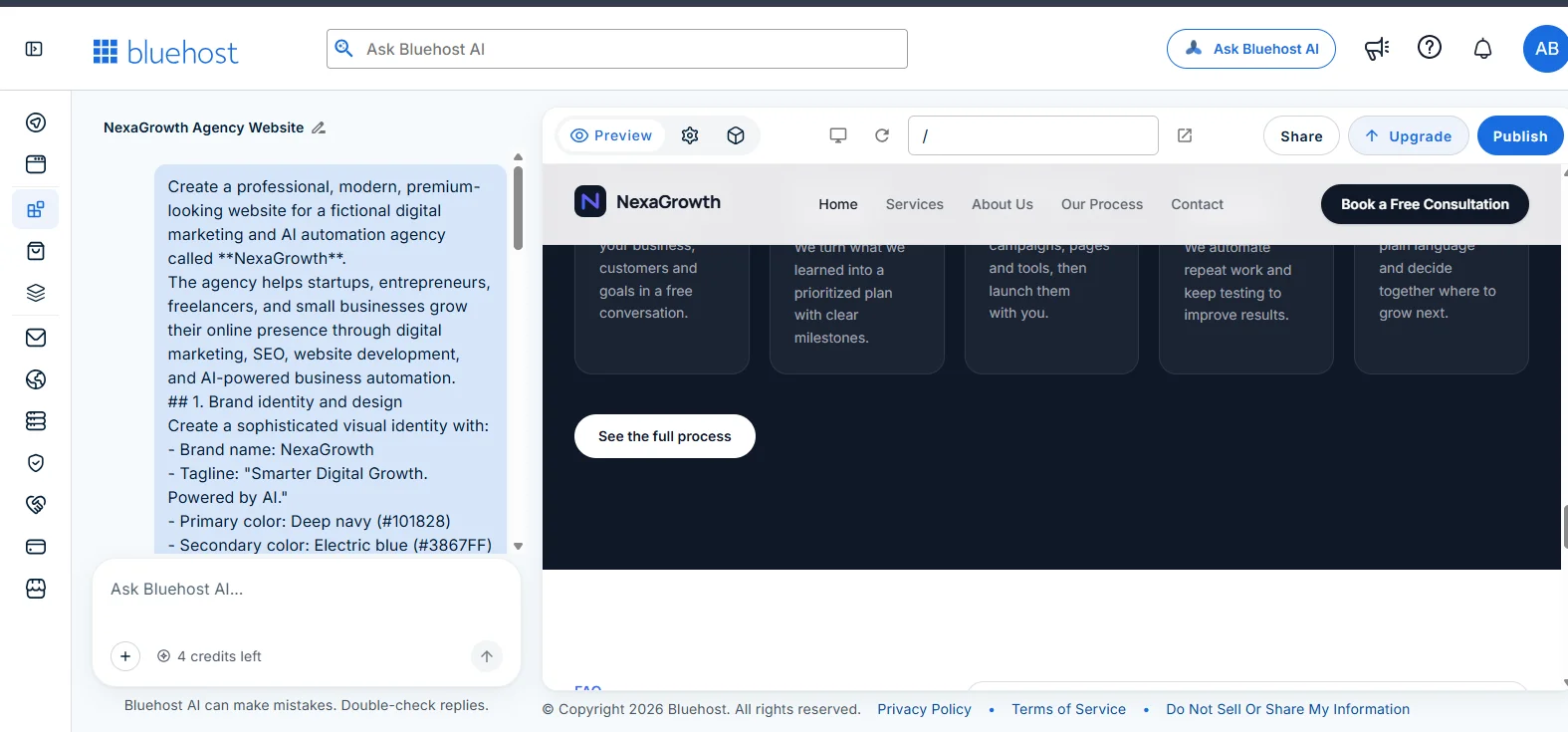
The builder answered with a short summary. It said the site was ready in a clean navy, electric blue and purple look, with five pages and a consultation booking form on the Contact page. It was also upfront about one limit. My brief was cut off after the hero subtitle, so the other sections were its own work, and the address, phone number, hours, services, process steps and FAQs were samples to edit later.
I like that honesty. A tool that quietly invents a business address and lets you publish it would be a liability. Here you are told exactly which parts are placeholders.
What came out: a homepage that looks like a real agency site
The homepage opens with a pill that carries the tagline, “Smarter Digital Growth. Powered by AI.”, then a large headline: “Grow Your Business Faster with Smarter Digital Solutions.” Below it sit two buttons, “Book a Free Consultation” and “Explore services”, and the navigation has Home, Services, About Us, Our Process and Contact, plus a dark call-to-action button at the right.
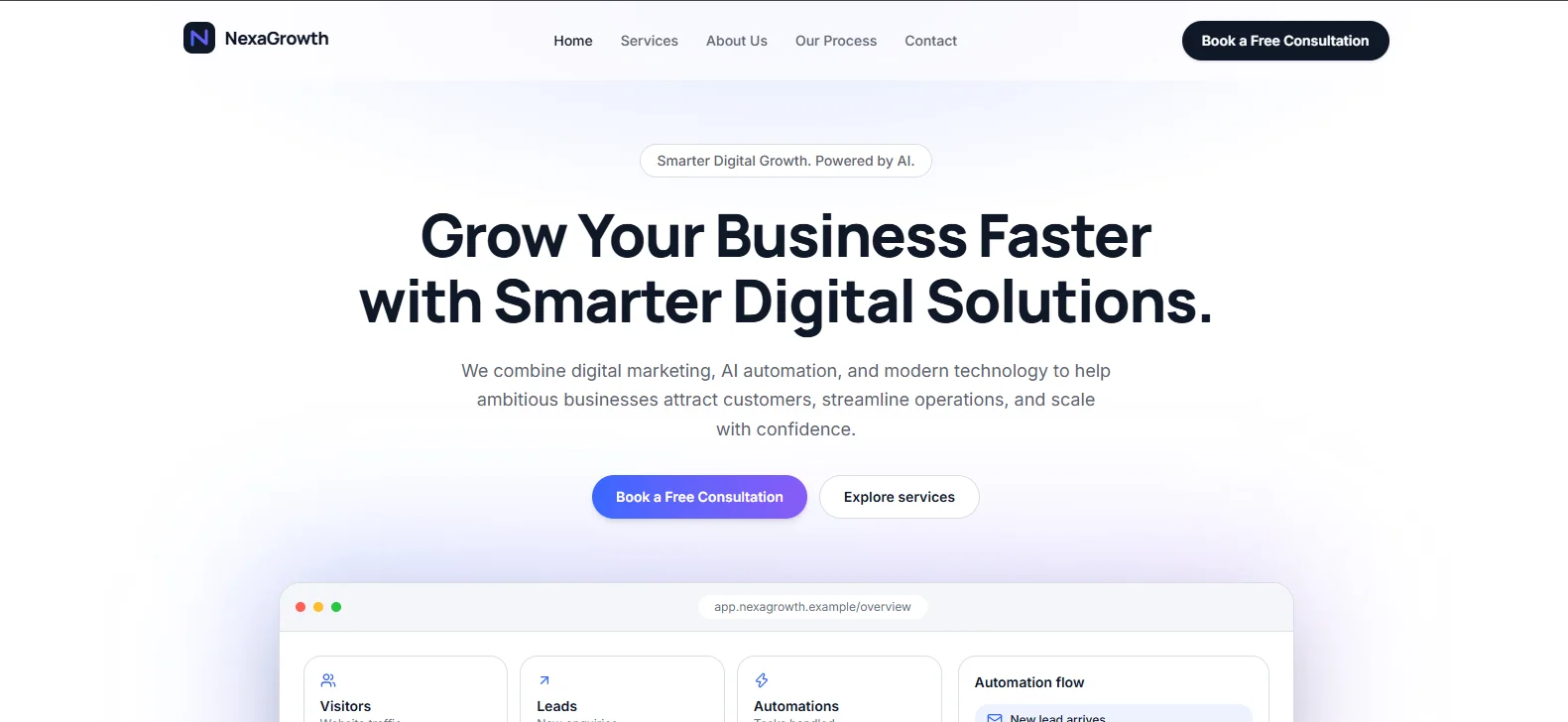
Everything under the hero text was the builder’s decision. It added a browser-style dashboard mockup with cards for Visitors, Leads and Automations, and an “Automation flow” card that starts with “New lead arrives”. For an agency that sells AI automation, that is a smart visual. It explains the offer without a paragraph of text, and I did not ask for it.
The spacing, type sizes and button styling stay consistent from the top of the page to the bottom. That is the difference between a generated site that looks finished and one that looks assembled, and it is the main reason I would use this tool for a first draft.
The Our process section shows how well it fills the gaps
The best test of any AI builder is a section you did not describe. My brief never spelled out the process, so the builder wrote one. It produced a dark section titled “From first call to steady growth in five steps”, with the line “A clear path, so you always know what happens next.” Five numbered cards follow: Discovery call, Strategy and roadmap, Build and launch, Automate and optimize, and Report and scale. A “See the full process” button closes the section.
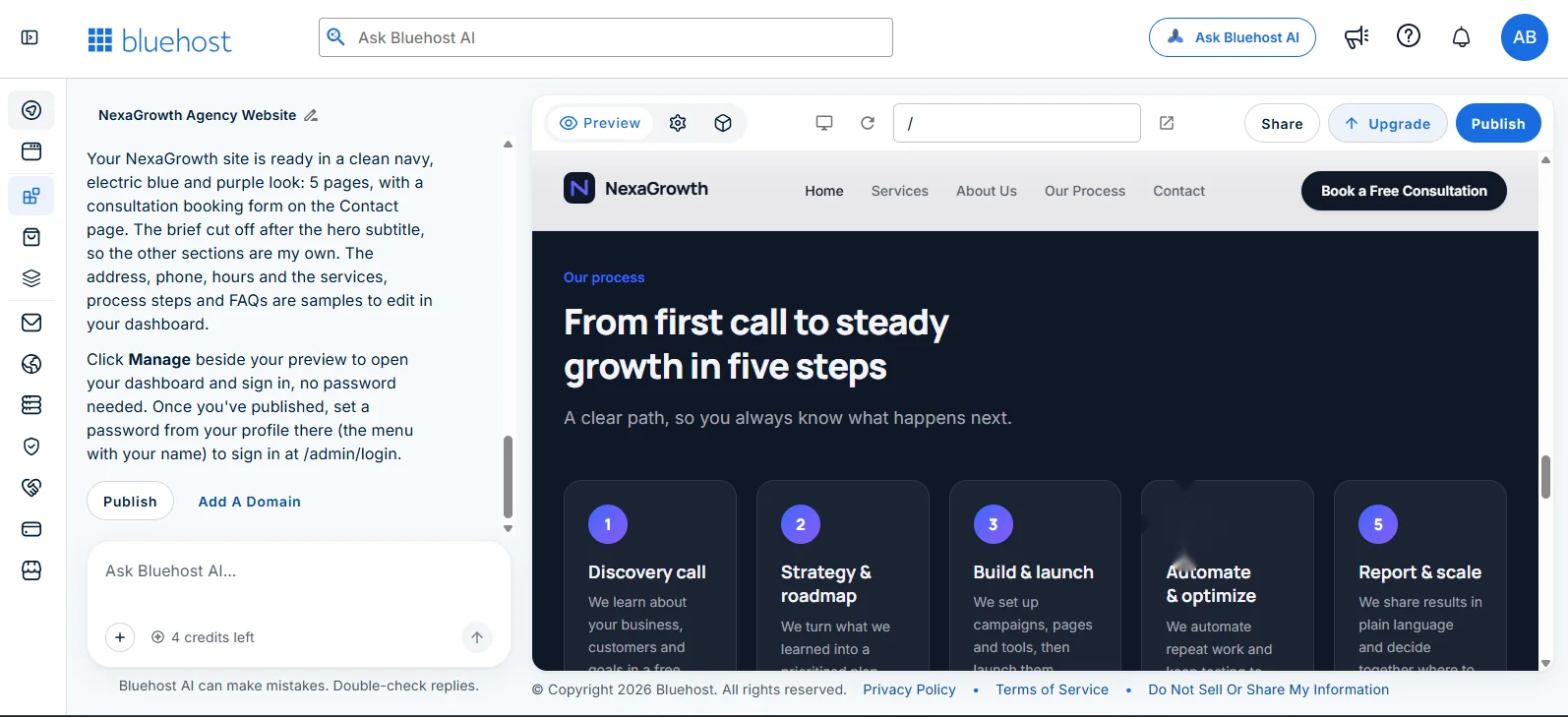
The structure is sensible and the copy reads well, but it is generic. “We learn about your business, customers and goals in a free conversation” could belong to any agency. That is the pattern to expect: the layout and tone are strong, and the specifics are on you. Plan an editing pass for every section the builder wrote on its own.
Editing and publishing happen in the same chat
The editor is a split screen. The chat sits on the left. The preview sits on the right, with a device switch, a reload button, a page path field, and Share, Upgrade and Publish buttons along the top. You change the site by asking for changes in plain language: layout, text or a new feature. Bluehost says changes stay private until you publish again, so you can experiment freely.
Account access is simple. The builder told me to click Manage beside the preview to open the dashboard, where I was signed in without a password. After publishing, it said you can set a password from your profile and use it to sign in at /admin/login. The reply also offered two buttons: Publish, and Add A Domain.
Free sites publish on a Bluehost subdomain. Connecting your own domain needs a paid plan, and domain registration and renewal are separate charges.
Pricing: $0 to start, no credit card, with paid plans from $20/mo
Pricing is built on credits. One message uses one credit, the AI’s clarifying questions are free, and hosting never costs credits. When your credits run out, new changes pause, but a published site stays online. Monthly plan credits and top-ups expire after 30 days.
$0 to start, no credit card. Paid plans from $20/mo.
| Plan | Price | Credits | Notable limits and extras |
|---|---|---|---|
| Free | $0, no credit card required | 5 a day, up to 30 a month | Unlimited websites and apps, published on a bluehost.ai subdomain |
| Lite | $20.00/mo, billed monthly | Up to 100 a month, no daily limit | Custom domains, on-demand credit top-ups, Bluehost badge removed |
| Standard | $40.00/mo, billed monthly | 200 a month | Everything in Lite |
My own screenshots show a counter reading “4 credits left”, which fits the free plan’s small daily allowance. For a first site that is enough to try the idea, so you can start with the free plan and judge the output before paying anything. The daily cap is the thing to plan around. A site with many pages and many revisions will not fit into 5 messages a day, so expect to spread the work over several days or move to Lite.
Where it shines and where it falls short
- A five-page site with a consistent navy and electric blue design came out of a single brief.
- The builder was honest about which content was a placeholder.
- Hosting is included and never uses credits, and a live site stays online at zero credits.
- Starting is $0 with no credit card, so the first test costs nothing.
- Forms, bookings and admin panels are possible, so it is not limited to brochure pages.
- Generated copy is generic until you give it real details, and sample contact details must be replaced.
- The free plan’s 5 credits a day slow down heavy editing.
- A custom domain, and removal of the Bluehost badge, need a paid plan.
- Native iOS and Android apps are not supported.
- Credits expire after 30 days, so do not stockpile them.
Who should use Bluehost AI Builder
It fits freelancers, consultants and small businesses that need a credible site without hiring a designer. It also suits people who want to test a business idea with a real, hosted page, and agencies that want a quick first draft to show a client. The preview-then-publish flow makes it easy to iterate privately.
It is less suited to anyone who needs pixel-level control or a large content site with hundreds of pages. In that case a hands-on builder or a custom theme gives you more control. If you are somewhere in the middle, test on the free plan first, because the first draft tells you quickly whether the output matches your taste.
How to write a brief that survives the first build
My experience suggests a few habits that make the first build better and cheaper in credits:
- Put the essentials first. My brief was cut off after the hero subtitle, so the builder improvised the rest. Lead with the business, audience, pages and tone.
- Give exact colours. Hex codes such as #101828 and #3867FF produced the navy and electric blue look I wanted.
- List the pages. Name the five pages you want and what the Contact page should do, such as a consultation booking form.
- Supply real details. Add your real address, phone number, hours and services in the brief so the sample text never reaches the live site.
- Answer the clarifying questions. They are free, and better answers mean fewer paid revision messages.
Build your first site in four steps
- Open Bluehost AI Builder and create a free account. The free plan is $0 and asks for no credit card.
- Paste your brief. Cover the business, audience, colours, pages and tone, then answer the clarifying questions.
- Review the preview and replace the placeholders. Ask in plain language for changes, one batch at a time, to save credits.
- Publish. Go live on the Bluehost subdomain, or upgrade to a paid plan and add your own domain.

Build your first site with Bluehost AI Builder
Write a short brief, answer the questions and see a live preview before you spend anything. It is $0 to start, no credit card, and paid plans start from $20/mo when you are ready for a custom domain.
Try Bluehost AI Builder free → Affiliate link. BoostStash may earn a commission if you sign up.Questions people ask about Bluehost AI Builder
Is Bluehost AI Builder free?
You can start for $0, no credit card. The free plan gives 5 credits a day, up to 30 a month, and publishes on a Bluehost subdomain. Paid plans from $20/mo add custom domains and more credits.
Do I need a credit card to try it?
No. Bluehost lists the free plan as requiring no credit card. Start with the free plan and decide about upgrading after you see the result.
Does hosting cost extra?
No. Hosting is included on every plan and never uses credits. A published site stays online even when your credits run out. Domain registration and renewal are separate charges.
Can I use my own domain?
Yes, on a paid plan. You can connect a domain you already own, and the builder also suggests names during publishing. Free sites use a Bluehost subdomain.
Can it build more than a simple website?
Yes. Bluehost describes web apps with an admin panel, user accounts and roles, forms, data storage, bookings and email alerts. Native iOS and Android apps are not supported.
Is the generated content ready to publish?
Not without a review. In my test the builder labelled the address, phone, hours, services, process steps and FAQs as samples. Replace them with your real details before going live.
How I put this review together
The build, the prompt and every screenshot come from my own Bluehost AI Builder project. The plan details, credit rules and feature list come from Bluehost’s AI Builder page, checked on November 17, 2026, and the figures above follow that page. Bluehost runs promotions and may change plans, so check the live page for current prices.