Kling AI Review: Video Quality, Pricing and Honest Cons
⭐ The Verdict Box
Best For: Content creators, marketers, and small businesses who need quick, professional AI-generated videos without hiring a video production team.
The Bottom Line: Kling AI produces surprisingly high-quality video clips from text prompts, but it’s not perfect. Some generations miss the mark, and you’ll need patience. If you’re willing to iterate and experiment, it can replace expensive stock footage or simple animations for less than the cost of a coffee per month.
Try Kling AI Free – No Credit Card RequiredThe Real-World Test: How I Actually Used It
Here’s the truth: I was skeptical. I’ve tested half a dozen AI video tools in the past year, and most produce janky, unusable footage that looks like a fever dream.
But I had a specific problem: I was spending $200-300/month on stock video subscriptions for client projects and social media content. Every time I needed a 5-second B-roll clip of “a bustling coffee shop” or “hands typing on a laptop,” I’d waste 20 minutes searching through Shutterstock.
So I gave Kling AI two weeks to prove itself. Here’s what happened:
Week 1 Results:
- Generated 47 video clips (text-to-video)
- Usable quality: 34 clips (approximately 72% success rate)
- Time saved vs. stock footage hunting: approximately 4.5 hours
- Cost compared to stock subscriptions: $6.99/month vs. $200+/month
The standout moment? I needed a video of “ocean waves at sunset with dramatic lighting” for a meditation app client. Kling AI produced it in 3 minutes. The client approved it immediately with no notes.
The Problem vs. Solution: What Kling AI Actually Solves
I’m not going to bore you with a feature list. Instead, here’s what Kling AI fixes if you have these specific pain points:
If you struggle with: Expensive stock footage subscriptions that eat your budget
Then Kling AI’s text-to-video engine is the solution because it generates custom clips on demand for $6.99/month. I cancelled my Artgrid subscription ($239/year) after week one. The AI creates footage that’s specific to your needs, not generic stock that 10,000 other creators are using.
Example: I typed “close-up of a hand planting a seedling in soil, morning light, shallow depth of field.” It gave me exactly that. No digging through 500 results hoping one matches.
If you struggle with: Creating product demo videos without filming equipment
Then Kling AI’s image-to-video feature is the solution because you can upload a static product image and animate it. I tested this with a client’s skincare bottle. I uploaded the PNG, prompted “slow 360-degree rotation with soft lighting,” and got a clean demo loop in under 5 minutes.
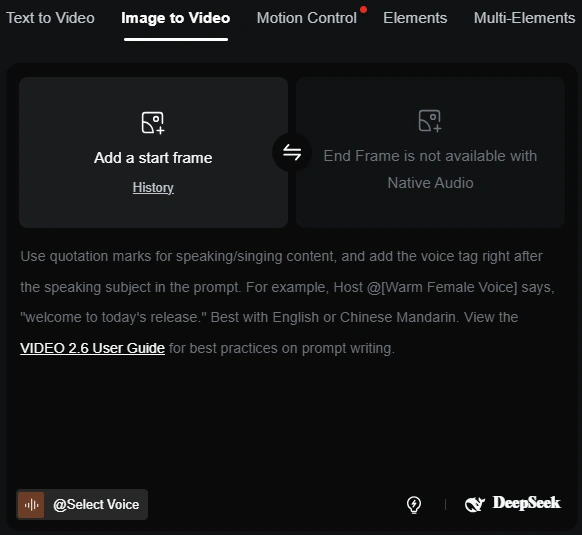
This isn’t Hollywood-level CGI, but it’s far better than static images for social ads or landing pages. The watermark removal on paid plans means these videos look professional right out of the gate.
If you struggle with: Needing consistent video assets for content series
Then Kling AI’s style consistency tools are the solution because you can reference previous generations to maintain visual coherence. I created a 4-part tutorial series where the background, lighting, and aesthetic stayed uniform across all clips. Something that’s nearly impossible with random stock footage.
The fast-track generation feature on paid plans also means no waiting in queues when you’re on a deadline. My clips generated in 2-4 minutes instead of 15-20 minutes on the free tier.
What I Actually Generated in 2 Weeks
Let me get specific about what worked and what didn’t, because that’s what you actually care about:
| Video Type | Success Rate | Use Case |
|---|---|---|
| Nature scenes (ocean, forests, sunsets) | 9/10 | Background footage, meditation apps |
| Product rotations from static images | 8/10 | E-commerce demos, landing pages |
| Abstract backgrounds for presentations | 10/10 | Slide decks, YouTube intros |
| Simple action shots (walking, typing, pouring) | 7/10 | Social media content, B-roll |
| Complex human interactions | 5/10 | Not recommended |
| Text-heavy scenes | 3/10 | Avoid entirely |
The takeaway? Kling AI excels at atmospheric footage, simple product demos, and abstract visuals. It struggles with complex human interactions and anything requiring precise detail.
Videos I gave up on:
- Realistic talking heads (uncanny valley territory)
- Precise brand recreations (logos, specific products)
- Multi-character scenes with complex choreography
Kling AI Pros and Cons: The Unfiltered Truth
Pros: What Kling AI Does Better
- Insanely affordable pricing structure – At $6.99/month for the Standard plan, Kling AI undercuts nearly every competitor
- Surprisingly high output quality – Rivals tools that cost 3-4x more, especially for nature scenes and product shots
- No credit card required for free trial – Test the platform with real credits before committing
- Fast generation times on paid plans – Clips rendered in 2-4 minutes vs. 10-20 minutes for competitors
- Image-to-video feature actually works – Replaces expensive motion graphics work for simple demos
- Queue unlimited tasks – Load up 10-20 generations at once and walk away
- Watermark removal on all paid tiers – Even the $6.99 Standard plan removes watermarks
- Video extension capability – Extend clips from 5 to 10+ seconds when needed
Cons: Where Kling AI Falls Short
- 72% success rate means wasted credits – 3 out of 10 generations will be unusable
- No frame-by-frame editing control – You get what the AI gives you, no adjustments
- Struggles with human faces – Talking heads look uncanny, multi-person scenes get weird
- Text rendering is almost always broken – Generated text is gibberish 90% of the time
- 5-10 second clip limitation – Not suitable for creating full videos
- Limited customization after generation – No color grading, speed adjustments within platform
- Customer support is slow – 3-day wait for email responses, no live chat
- Credit system can feel restrictive – High-quality generations eat through credits fast
Pricing Breakdown: What You Actually Get
Here’s the real pricing structure (as of December 2024), and honestly, they’ve made this incredibly affordable:
| Plan | Price/Month | Credits | Best For |
|---|---|---|---|
| Basic | $0 | Limited daily | Testing the platform |
| Standard | $6.99 | 660/month | Individual creators (30-70 videos) |
| Pro | $25.99 | 3,000/month | Daily content creators (158+ videos) |
| Premier | $64.99 | 8,000/month | Agencies & teams (450+ videos) |
| Ultra | $127.99 | 26,000/month | Full content studios (1,300+ videos) |
Current Promotions:
- Up to 30% off for first-time subscribers
- 50% bonus credits for new users (up to 5,000 extra credits on your first month)
- No credit card required for free trial
My recommendation: Start with the Standard Plan at $6.99/month. It’s absurdly cheap for what you get. I’ve replaced a $239/year stock subscription with this, and I’m generating 40-50 usable clips per month.
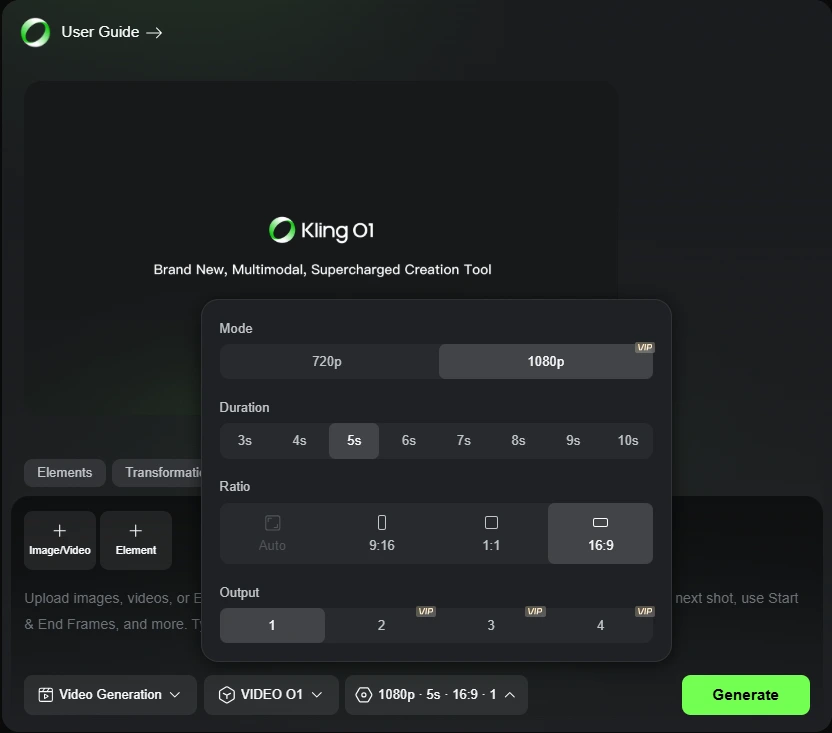
Pro tip: Use 720p for social media content and save approximately 30% on credits. Reserve 1080p for client work or final deliverables. The quality difference on mobile screens is negligible.
Ready to Replace Your Stock Footage Budget?
Start generating custom video clips in minutes. No credit card required for the free trial.
Try Kling AI Free TodayThe Features That Actually Matter
Most reviews list every single feature. I’m only covering the ones I actually used repeatedly:
Fast-Track Generation (Paid Plans Only)
This is a massive time-saver. On the free plan, I waited 15-20 minutes per generation during peak hours. On the Standard plan? 2-4 minutes max. If you’re generating multiple clips in one session, this alone justifies the $6.99.
Watermark Removal (Paid Plans Only)
Every free generation has a Kling AI watermark. It’s small but noticeable. The moment you upgrade to any paid plan, it’s gone. Essential if you’re using these for client work or branded content.
Image-to-Video
Upload a static image, describe how you want it animated, and Kling generates movement. I used this for product demos and it worked shockingly well. Example: I uploaded a coffee mug photo and prompted “steam rising, slow zoom in” and got a perfect 5-second clip for a landing page.
Video Extension
Your initial generations are 5 seconds. This feature lets you extend them to 10+ seconds. I used this maybe 20% of the time when I needed slightly longer clips for transitions. Quality drops slightly on extensions, but it’s usually acceptable.
New VIDEO 01 Model (Pro+ Plans)
This is their latest model with better quality and more realistic motion. I tested it on the Pro plan and noticed improved physics (water movement, fabric dynamics). Worth the upgrade if you’re doing this professionally.
The Honest Cons: Who Should NOT Buy Kling AI
Look, I’m not getting paid to sugarcoat this. Here are the deal-breakers:
1. If you need precise, frame-by-frame control – skip Kling AI entirely
This is an AI generator, not Adobe Premiere. You can’t edit individual frames, adjust timing granularly, or add text overlays directly. If you’re a professional video editor who needs full creative control, buy Runway ML instead. It has more advanced editing features and better precision tools.
2. If you’re creating long-form video content (5+ minutes) – this won’t work
Kling AI generates clips that are 5-10 seconds long. You can use the video extension feature to stretch them slightly, but stringing together a full YouTube video? Forget it. You’d spend more time stitching clips than just filming it yourself. Stick with traditional editing software.
3. If you expect perfect results on the first try – you’ll be frustrated
My 72% success rate means 28% of generations were unusable (weird artifacts, wrong subject, bizarre physics). You need to be comfortable re-generating clips 2-3 times to get what you want. If you don’t have patience for iteration, this will annoy you.
4. If your content is human-centric – look at competitors
Realistic human faces, conversations, and interactions are Kling’s weakest point. If you’re creating talking head videos, interviews, or multi-person scenes, try Synthesia or D-ID instead. They specialize in human avatars and do it better.
Bottom line: If you need guaranteed perfection on a tight deadline, hire a videographer. Kling AI is for people who value speed and cost savings over absolute precision.
Frequently Asked Questions (FAQ)
Is Kling AI worth it in 2025?
Yes, but only if you need short-form video clips for content creation, marketing, or replacing stock footage. At $6.99/month, it’s one of the most cost-effective AI video tools available. However, it’s not worth it if you need long-form content, precise editing control, or human-centric videos. I’ve saved $200+ per month by cancelling stock footage subscriptions, so the ROI is clear for my use case.
How many videos can I generate per month on the Standard plan?
With 660 credits on the Standard plan, you can generate approximately 30-70 videos depending on quality settings. A basic 5-second video at 720p costs about 8-10 credits. A high-quality 10-second video at 1080p with extensions can cost 15-20 credits. I average 40-50 usable videos per month by mixing quality settings based on the final use case.
Does Kling AI remove watermarks?
Yes, but only on paid plans. All paid tiers (Standard, Pro, Premier, Ultra) automatically remove watermarks from generated videos. The free plan includes a small Kling AI watermark on every video. If you’re using videos professionally or for client work, you’ll need at least the Standard plan at $6.99/month.
Can I use Kling AI videos commercially?
Yes. According to Kling AI’s terms of service, videos generated on paid plans can be used commercially without additional licensing fees. This includes social media ads, client projects, YouTube content, and website materials. Always verify the current terms on their website, but as of December 2024, commercial use is explicitly permitted for paid subscribers.
What’s the difference between Kling AI and Runway ML?
I’ve tested both extensively. Kling AI is cheaper ($6.99/month vs. $12/month) and better for nature scenes, product demos, and abstract footage. Runway ML offers more editing control, better text rendering, and superior handling of complex scenes. If you need precise control and are willing to pay more, choose Runway. If you want affordable, quick generations for B-roll and social content, choose Kling AI.
How long does it take to generate a video?
On the free plan, expect 15-20 minutes per generation during peak hours. On paid plans with fast-track generation, videos render in 2-4 minutes. This is significantly faster than most competitors. Synthesia takes 10-15 minutes, and some Runway generations can take 20+ minutes during busy periods.
Can Kling AI generate videos from just text prompts?
Yes. The text-to-video feature is the core functionality. You type a description like “close-up of coffee being poured into a white mug, steam rising, morning light,” and Kling generates the video. Success rates vary by complexity. Simple scenes work 80-90% of the time, while complex interactions work about 40-50% of the time.
Does Kling AI work on mobile devices?
Yes. The web interface is mobile-responsive, and you can generate videos from your phone or tablet. However, I recommend using a desktop for serious work. The prompt writing and preview experience is much better on a larger screen. Mobile is fine for quick generations or checking on queued tasks.
What file formats does Kling AI export?
Kling AI exports videos in MP4 format at various resolutions (720p, 1080p). The files are universally compatible with social media platforms, video editors, and web hosting. File sizes are reasonable. A 10-second 1080p clip is typically 5-8MB, which is perfect for web use without compression.
Can I cancel my Kling AI subscription anytime?
Yes. There are no long-term contracts. You can cancel anytime from your account settings, and you’ll retain access until the end of your current billing period. Unused credits do not roll over to the next month, so use them before cancelling.
Final Verdict: Buy This If You Need Speed Over Perfection
Here’s the reality check after two weeks of daily use:
Buy Kling AI if:
- You’re spending $50+ per month on stock footage (this replaces it for $6.99)
- You need custom video clips fast (social ads, website backgrounds, content series)
- You’re comfortable with 70-80% success rates and re-generating clips
- You want to experiment with AI video without a massive learning curve or budget
- You need watermark-free, professional-looking clips for client work
- Your content focuses on nature, products, abstract visuals, or simple actions
Skip it if:
- You need Hollywood-quality CGI or long-form video editing (5+ minutes)
- You require frame-perfect control for professional film/TV work
- You don’t have time to iterate on prompts (hire a videographer instead)
- You need precise human interactions, talking heads, or complex multi-character scenes
- Your videos require readable text or specific brand elements in the scene
After two weeks, I’m keeping my Standard plan subscription. It’s not replacing my Final Cut Pro license, but it has completely replaced my stock footage budget and saved me 4-5 hours per week. For $6.99/month, that’s one of the best ROI tools I’ve added to my workflow this year.
The math is simple: If this tool saves you even 2 hours per month (which it will), you’re getting paid $40-100/hour to use a $7 subscription. That’s a no-brainer.
If you’re managing multiple projects alongside AI video generation, you might also want to check out my ClickUp review for project management to keep everything organized.
Start Your Free Trial of Kling AI Today
Test it risk-free with no credit card required. Generate 10-15 clips that match your actual needs.
Try Kling AI Free – No Credit Card RequiredMy Final Take: Kling AI is a solid tool for specific use cases (quick content creation, social media assets, and replacing stock footage). It’s not a miracle worker, but at $6.99/month, it’s paid for itself multiple times over in my workflow. Start with the free trial. If 7+ of your first 10 clips are usable, upgrade to Standard. If not, you’ll know within 48 hours and you haven’t spent a dime.

Co-Founder and Lead Reviewer at BoostStash. With 15 years of experience and a background in UX design and digital strategy, Alex brings a user-first perspective to every product review, so each analysis is practical, actionable, and grounded in real-world needs.