
When OpenAI dropped Sora 2 on September 30, 2025, it didn’t just launch a new AI model—it sent shockwaves through the entire content creation industry. Within five days, the invite-only iOS app hit 1 million downloads. Within a week, it topped the App Store charts and sparked copyright controversies that forced the company to completely reverse its policies.
Testing Sora 2 over the last two weeks has revealed both exciting capabilities and deeply concerning implications. This isn’t just another incremental AI upgrade—it’s a technology that’s fundamentally challenging how we think about video production, creative ownership, and truth itself.
What Is Sora 2?
Sora 2 is OpenAI’s second-generation text-to-video AI model, representing a massive leap from the original Sora that launched in February 2024. The difference is comparable to moving from a promising prototype to a production-ready tool.
The original Sora could generate visually impressive clips, but they were silent, occasionally glitchy, and limited in practical use. Sora 2 changes the game entirely by adding:
- Synchronized audio generation including dialogue, sound effects, and ambient noise
- Advanced physics simulation that respects real-world laws
- Up to 20 seconds of video in cinematic quality
- 1080p resolution for Pro users
- Multi-shot continuity with persistent world state
- Cameo features that let you insert yourself into AI-generated scenes
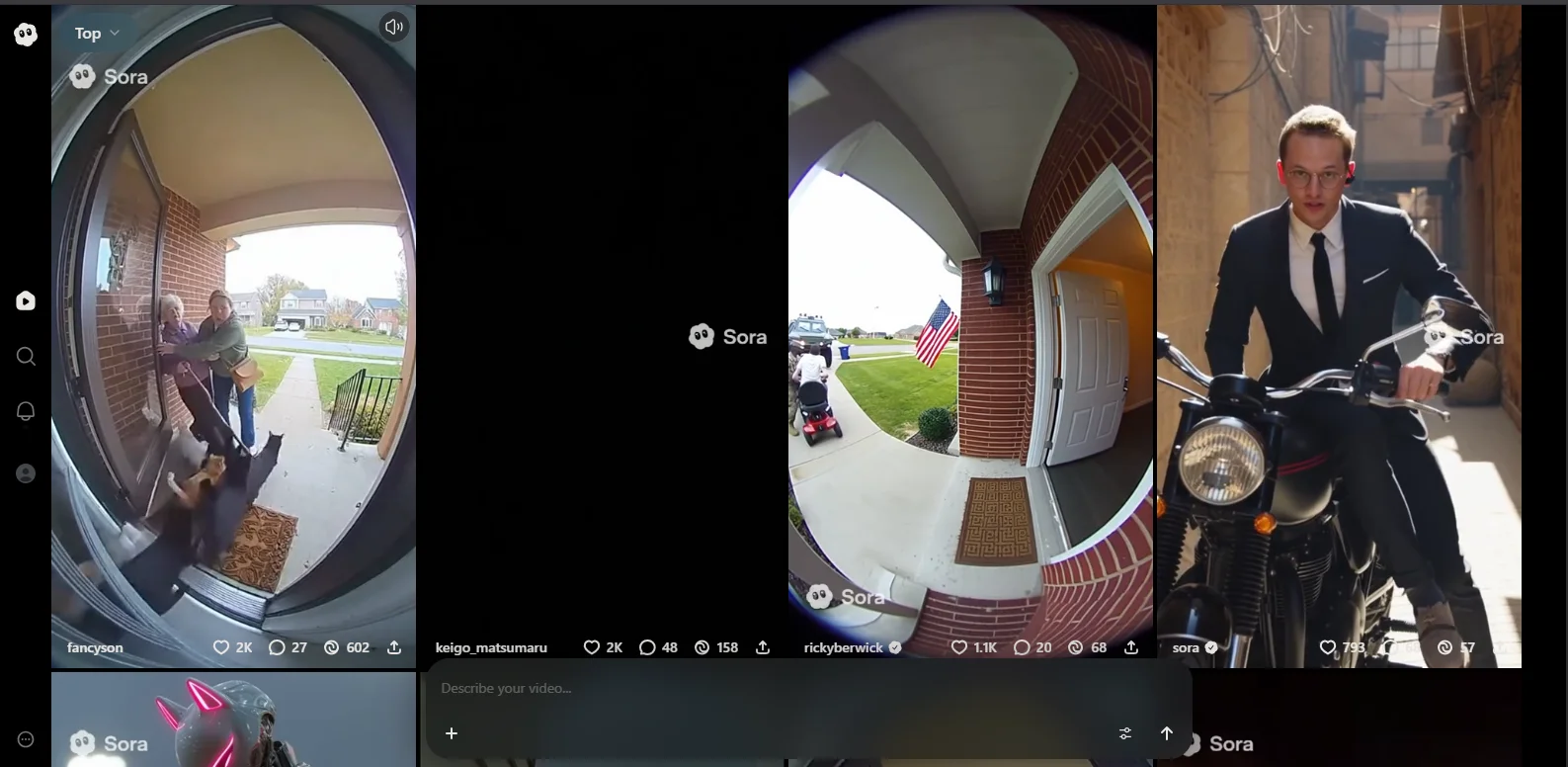
What makes this particularly significant is OpenAI’s approach: they’ve built an entire social media app around it—a TikTok-style platform where AI-generated content is the currency. This fundamentally differs from competitors like Google’s Veo 3 or Runway’s Gen-3.
The Technology: How Sora 2 Actually Works
Under the hood, Sora 2 uses what OpenAI calls a “diffusion transformer” architecture. The system processes video generation in stages, starting with random noise and progressively refining it based on text prompts. It simultaneously handles spatial information (what things look like) and temporal information (how they move over time), while understanding semantic context through natural language processing.
The physics simulation represents a critical breakthrough. Earlier AI video models would “cheat” to fulfill prompts. If you asked for a basketball player making a shot and specified they miss, the ball might magically teleport to the hoop anyway. Sora 2 actually models failure states—the ball bounces off the backboard with realistic physics. This might sound minor, but it’s crucial for any system claiming to simulate reality.
The model was trained on massive video datasets (OpenAI hasn’t disclosed specifics, which is part of the controversy discussed later), learning everything from camera movements to object interactions to lighting conditions.
Key Features That Actually Matter
Audio-Visual Synchronization
This is the headline feature, and it genuinely delivers. When you generate a video of someone speaking, Sora 2 creates matching lip movements and voice. When you create a scene with a car driving by, you get engine sounds and Doppler effects. When you generate a rainstorm, you hear the patter of drops.
Is it perfect? No. The lip-sync can look off in close-ups, and voices sometimes have that slightly artificial quality. But for short-form content—the kind you’d post on Instagram Reels or TikTok—it’s surprisingly effective.
The Cameo Feature
This is either brilliant or terrifying, depending on your perspective. After recording a short video and audio sample of yourself (one-time setup), you can drop yourself into any AI-generated scene. The system captures your likeness and voice, then renders you into whatever scenario you prompt.
Want to see yourself as an astronaut floating in space? Done. Want to create a cooking tutorial where you’re the chef? Possible. Want to prank your friends by putting them in absurd situations? That’s where things get ethically murky.
OpenAI added controls after backlash, allowing users to set restrictions on how their cameos can be used (no political content, no profanity, etc.). But as discussed later, these guardrails are already being circumvented.
Improved Physics and Motion
This is where Sora 2 genuinely impresses. The model understands:
- Momentum and inertia – objects don’t stop unnaturally
- Gravity and buoyancy – things fall and float realistically
- Object permanence – items don’t vanish between frames
- Collision dynamics – impacts look believable
Testing with prompts for complex actions—a gymnast performing a backflip, water splashing from a paddle strike, fabric blowing in wind—produced results leagues ahead of competing tools. The model makes mistakes, but they’re usually “smart” mistakes—things an actual camera operator might capture, not impossible physics violations.
Multi-Shot Continuity
Earlier text-to-video models struggled with consistency. Generate two separate clips of the same character, and they’d look completely different. Sora 2 maintains world state across shots. If you create a scene with a red car in shot one, that same red car persists in shot two (assuming you prompt for continuity). Characters maintain appearance, lighting conditions stay consistent, and locations remain recognizable.
This opens up narrative possibilities that weren’t practical before. You can actually tell a story across multiple clips without everything looking disjointed.
Pricing: What It Actually Costs
OpenAI has structured Sora 2 pricing in multiple tiers, each targeting different user types and use cases:
Free Tier
Invite-Only
- ✓ 480p resolution
- ✓ Limited generations
- ✓ Watermarked videos
- ✓ Basic features
ChatGPT Plus
$20/month
- ✓ 50 videos/month at 480p
- ✓ 10-15 videos at 720p
- ✓ 5-10 second duration
- ✓ Visible watermarks
ChatGPT Pro
$200/month
- ✓ 500 priority videos/month
- ✓ 1080p resolution
- ✓ Up to 20 seconds
- ✓ No watermarks
- ✓ Sora 2 Pro access
- ✓ Unlimited relaxed gen
Credit System Considerations
Sora 2 uses a credit-based system behind the scenes. Higher resolution and longer videos consume more credits. A 480p, 5-second clip might use 20-50 credits, while a 1080p, 20-second video could consume 500-2,000 credits.
This matters because even with “unlimited” relaxed generations on the Pro plan, you’re still bound by compute capacity during peak times.
Real-World Performance: What Works and What Doesn’t
After generating over 100 test videos across various categories, clear patterns emerged about where Sora 2 excels and where it struggles.
What Sora 2 Excels At
- Social Media Content: Short, stylized clips for Instagram, TikTok, or YouTube Shorts work brilliantly. The 20-second limit aligns perfectly with these platforms, and the audio integration means content feels complete.
- Concept Testing: Filmmakers or marketers who need to visualize an idea quickly will find Sora 2 transformative. Instead of explaining a concept in text or crude storyboards, you can generate a rough visual in minutes.
- Animated Style Content: Sora 2 handles anime, cartoon, and stylized visuals better than photorealism in many cases. The “uncanny valley” effect is less pronounced when the model isn’t trying to perfectly simulate reality.
- Product Demos: For software companies or B2B brands, generating explainer-style videos with UI mockups and simple animations works well.
Where Sora 2 Struggles
- Hand and Face Details: Close-ups of hands remain problematic. Fingers can merge, multiply, or move unnaturally. Facial details in extreme close-ups sometimes drift into uncanny territory.
- Text and Typography: If your prompt includes visible text (signs, screens, documents), expect garbled results. The model hasn’t mastered generating legible, consistent text.
- Complex Human Interactions: Two people shaking hands or dancing together often results in anatomical impossibilities. The model understands individual human movement better than interactions between multiple people.
- Long-Form Narratives: While multi-shot continuity has improved, creating a coherent 60-second story (by stitching multiple 20-second clips) remains challenging. Consistency degrades, and you’ll spend significant time iterating.
- Precision Control: You can’t specify exact camera movements, precise timing, or frame-by-frame actions. The model interprets your prompt, but you’re not directing in the traditional sense.
Sora 2 vs. Traditional Video Production: The Economics
This is where Sora 2 becomes genuinely disruptive. Comparing the creation of a simple 2-minute product demo video reveals dramatic differences:
Production Cost Comparison
Creating a 2-minute product demo video
Traditional Production
Sora 2 Production
That represents approximately a 92% cost reduction and 75% time savings. For marketing agencies, small businesses, and solo creators, this is transformative. For the traditional video production industry, it’s existential.
Here’s the critical caveat: quality isn’t equivalent. High-end brand films, commercials requiring specific performances, or content demanding precise narrative control still benefit from traditional production. Sora 2 works best for volume content, concept work, and projects where “good enough” is genuinely sufficient.
The Controversies: Copyright, Deepfakes, and Chaos
Copyright Nightmare
Sora 2 launched with an opt-out copyright policy: your intellectual property could be used in generated videos by default unless you actively contacted OpenAI to block it. Within days, users were flooding social media with AI-generated videos featuring copyrighted characters (SpongeBob, Mickey Mouse, Pikachu), famous brand logos, stylistic reproductions of known artists’ work, and celebrity likenesses without permission.
The Motion Picture Association, Creative Artists Agency, and numerous individual creators erupted in protest. OpenAI CEO Sam Altman claimed to be surprised by the backlash (which strains credulity given the ongoing lawsuits against OpenAI for training data issues).
Within a week, OpenAI reversed course, switching to an opt-in model where rights holders must explicitly permit their properties to be used. They promised revenue sharing for those who opt in and introduced a copyright disputes form. But the damage was done.
Watermark Removal
OpenAI embeds a moving watermark on all generated videos to identify them as AI-created. It also includes C2PA metadata for provenance tracking. Third-party tools to remove these watermarks appeared within seven days of launch. Simple video editing techniques can mask the watermark. The C2PA metadata can be stripped during re-encoding.
Sam Altman acknowledged in a Q&A that “people are already finding ways to remove it,” which suggests either remarkable naivety or willful ignorance. These removal tools were inevitable and predictable. This means AI-generated videos can be passed off as real footage with minimal effort.
Deepfake and Misinformation Risks
The realism of Sora 2 is good enough to fool casual observers. Early examples that went viral included fabricated news footage of events that never happened, celebrity deepfakes saying things they never said, dangerous pranks and harassment content, and scam videos designed to defraud elderly victims.
Security researchers warn that the combination of realistic video generation, easy watermark removal, and the cameo feature creates a perfect storm for financial fraud, political disinformation, reputation attacks, and revenge content.
OpenAI has implemented safety measures including restrictions on generating real public figures, age verification (18+ required), content moderation for explicit material, and user reporting systems. But motivated bad actors are already finding workarounds.
The Artist and Creator Backlash
Beyond copyright issues, there’s a deeper concern about the impact on creative professionals. The Creative Artists Agency warned that Sora threatens creators’ livelihoods without compensation or consent. Filmmakers are asking: what happens when studios can simply instruct an AI to “finish this film in Christopher Nolan’s style” instead of hiring directors?
Creative signatures—the things that make work recognizable and valuable—become reproducible commodities. The model learns from bodies of work, then generates infinite variations without the creator’s involvement or benefit. Some argue this is the natural evolution of tools. Others see it as theft dressed up as innovation.
Sora 2 vs. Competitors
How does Sora 2 stack up against alternatives?
Google Veo 3
Advantage: Superior resolution (4K support), deep Google ecosystem integration
Disadvantage: Shorter video duration (10-15 seconds), less accessible pricing
Best for: Enterprise teams already using Google Workspace
Runway Gen-3
Advantage: Better professional editing tools, precise camera control
Disadvantage: Higher cost ($95/month for comparable features), shorter clips
Best for: Filmmakers needing cinematographic precision
Sora 2’s Position
- Longest duration (20 seconds)
- Best physics accuracy
- Most accessible pricing ($20-$200/month)
- Strongest audio integration
- Best ChatGPT integration (if you’re already in that ecosystem)
For most individual creators and small teams, Sora 2 offers the best balance of quality, features, and value. For large enterprises with specific workflow needs, Veo 3 might integrate better. For professional filmmakers, Runway’s precision tools might be worth the premium.
Looking for more AI marketing solutions? Check out our comprehensive guide on AI marketing tools for interior designers.
Practical Use Cases: Who Should Use Sora 2?
Based on extensive testing, clear patterns emerged about who benefits most:
Strong Use Cases
- Social media creators producing high volumes of short-form content
- Marketing teams creating ad variations and concept tests
- Educators generating explainer videos and visual aids
- Small businesses needing affordable video content
- Indie game developers creating trailers and promotional material
- Rapid prototyping for any visual concept
Weak Use Cases
- High-end commercial production (quality ceiling too low)
- Documentary or journalistic work (ethical concerns)
- Projects requiring precise control (too unpredictable)
- Long-form narrative content (consistency issues)
- Anything requiring text overlays (technical limitations)
My Verdict: Powerful, Problematic, and Inevitable
After two weeks with Sora 2, here’s the assessment:
The Technology (8.5/10): Genuinely impressive. The combination of video quality, audio integration, and physics simulation represents a significant breakthrough. It’s not perfect, but it’s shockingly good for where we are in AI development.
The Value Proposition (9/10): At $20-$200/month, the cost-to-capability ratio is outstanding for the right use cases. For volume content creation, it’s transformative.
The Execution (6/10): The launch was rushed and poorly thought through. The copyright controversies were entirely predictable, the watermark removal was inevitable, and the social app strategy feels half-baked.
The Ethics (3/10): OpenAI hasn’t adequately addressed training data consent, creator compensation, or misuse prevention. The guardrails are easily circumvented, and the opt-in policy reversal suggests they didn’t think through the implications.
Overall Assessment: Sora 2 is a powerful tool that will fundamentally change video content creation. It’s also an ethically problematic product that was released before adequate safeguards were in place. Both things are true.
Should You Use Sora 2?
Recommendations depend on who you are:
If you’re a social media creator or marketer: Yes, absolutely. The productivity gains and creative possibilities outweigh the current limitations. Just be transparent about AI usage and respect intellectual property.
If you’re a professional filmmaker or artist: Approach with caution. Experiment with it for concept work, but don’t build your workflow around something this controversial and potentially disruptive to your industry.
If you’re a business owner: The economics are compelling for certain content types (ads, explainers, social content). But verify that AI-generated content aligns with your brand values and regulatory requirements in your industry.
If you’re concerned about ethics: Vote with your wallet. If the copyright and consent issues bother you (they should), consider waiting until OpenAI implements more robust protections and compensation models.
What’s Next: The Future of AI Video
Sora 2 is remarkable, but it’s not the endpoint. Based on OpenAI’s trajectory and competitor developments, expect:
- Longer videos (60+ seconds within 12 months)
- 4K resolution (coming in next major update)
- Better editing control (timeline-based tools, shot-by-shot direction)
- API access (programmatic video generation for developers)
- Mobile video editing (full creation workflow on iOS/Android)
- VR/3D video (spatial content generation)
The pace of advancement is accelerating, not slowing down. What seems impossible today will be routine next year.
Frequently Asked Questions
How much does Sora 2 cost?
Sora 2 offers three pricing tiers: Free (invite-only during rollout with limited features), ChatGPT Plus at $20/month (50 videos/month at 480p), and ChatGPT Pro at $200/month (500 priority videos, 1080p resolution, no watermarks).
Can Sora 2 generate audio for videos?
Yes, Sora 2 features full audio-visual synchronization, generating dialogue with matching lip movements, sound effects, and ambient noise that corresponds to the visual content.
What is the maximum video length for Sora 2?
Sora 2 can generate videos up to 20 seconds in length, which is the longest among competing text-to-video AI models. The length varies by subscription tier, with Free and Plus tiers limited to 5-10 seconds.
Are Sora 2 videos watermarked?
Free and ChatGPT Plus tiers include visible watermarks on all generated videos. ChatGPT Pro ($200/month) provides watermark-free downloads, though OpenAI still embeds C2PA metadata for provenance tracking.
What are the main copyright concerns with Sora 2?
Sora 2 initially launched with an opt-out copyright policy, allowing users to generate videos featuring copyrighted characters and brands without permission. After backlash from industry groups and creators, OpenAI switched to an opt-in model requiring explicit rights holder permission.
How does Sora 2 compare to Runway Gen-3 and Google Veo 3?
Sora 2 offers the longest video duration (20 seconds vs. 10-15 seconds), best physics accuracy, and most accessible pricing ($20-$200/month). Google Veo 3 provides superior 4K resolution for enterprises, while Runway Gen-3 offers better professional editing tools at $95+/month.
Can I put myself in Sora 2 videos?
Yes, the Cameo feature allows you to record a short video and audio sample of yourself (one-time setup), then insert yourself into any AI-generated scene. OpenAI has added controls allowing users to restrict how their cameos can be used.
What are Sora 2’s biggest limitations?
Sora 2 struggles with hand and face details in close-ups, cannot generate legible text, has difficulty with complex human interactions, lacks precision control over camera movements and timing, and faces consistency challenges in long-form narrative content.
Final Thoughts
Sora 2 represents both the promise and the peril of AI development. It’s powerful enough to democratize video creation, putting professional-quality tools in everyone’s hands. It’s also powerful enough to enable widespread deception, economic disruption, and the erosion of trust in visual media.
OpenAI deserves credit for the technical achievement. They also deserve criticism for the rushed launch and inadequate ethical frameworks.
As someone who’s spent 15 years reviewing technology and building digital solutions, tools are neutral—it’s how we use them that matters. Sora 2 is a tool that can empower creators or enable bad actors. We’re about to find out which use case dominates.
Learn the technology, understand its capabilities and limitations, but approach it with both excitement and caution. This isn’t just another AI model—it’s a pivotal moment in how we create and consume visual information. The future of video content is being written right now. Make sure you’re part of shaping it responsibly.
The Social App: OpenAI’s TikTok Ambitions
Beyond the technology, OpenAI made a bold move by launching Sora as a standalone social media app (iOS-only at launch, Android coming). The app features:
This positions OpenAI in direct competition with established platforms. The strategic logic is clear: why let users export Sora content to TikTok or Instagram when you can capture that engagement yourself? Early traction has been impressive—over 627,000 downloads in the first week. But the app also became an immediate vehicle for controversial content.